A clip earns when it gets verified views, and views come from clips people actually watch and share. The good news: virality is less luck than most think. The same handful of choices show up in almost every clip that spreads. This is the step-by-step, plus what to do differently on YouTube, TikTok and X.
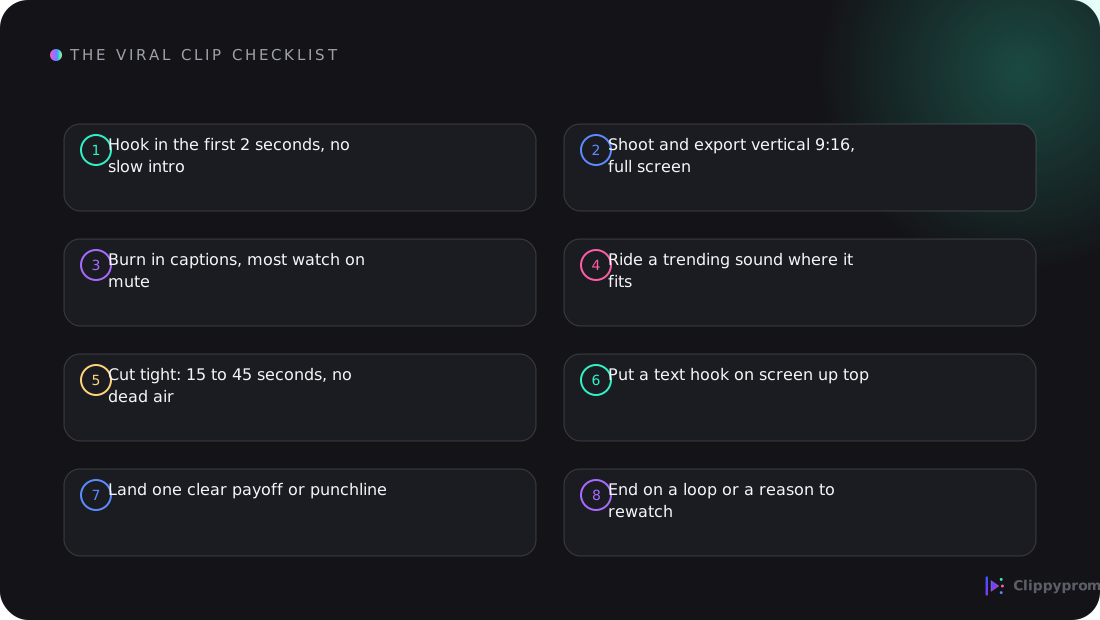
The step-by-step
1. Find the moment before you cut
Scrub the source content for the single strongest moment: a bold claim, a surprising number, a hot take, a clean explanation, a funny beat. One clip, one moment. Do not try to summarize the whole video; pick the part that would make someone stop scrolling.
2. Win the first 2 seconds
Most viewers decide in under two seconds. Open on the peak, not a slow intro or a logo. Start mid-action or mid-sentence on the most interesting line. If your clip needs a wind-up, cut the wind-up.
3. Add a text hook on screen
Put a short, punchy line of text at the top of the frame in the first second: the promise or the tension. "This is why the launch matters," "He just said the quiet part out loud," "The fastest way to X." The text hook carries the clip for the many people watching on mute.
4. Burn in captions
A large share of short-form is watched with the sound off. Always add captions, styled clean and readable, synced to the words. Auto-captions from the editing app are fine if you fix the obvious errors. Captions alone can lift watch time noticeably.
5. Keep it vertical and full-screen
Shoot, crop and export 9:16 vertical so the clip fills a phone screen. Letterboxed or horizontal clips get scrolled past. Fill the frame; crop in if you must.
6. Cut it tight
Remove every pause, filler word and dead second. Most clips that travel are 15 to 45 seconds. Shorter is usually safer than longer: it is better to leave people wanting more than to lose them halfway.
7. Use sound intentionally
Where it fits, ride a trending sound low under the clip, or keep the original audio if the words are the point. Do not bury a great soundbite under music. On music-driven platforms a trending track can boost reach; on talk-driven clips, clarity of speech wins.
8. Land one payoff, then loop
Every clip needs one clear payoff: the punchline, the answer, the reveal. End right after it. If you can make the last frame flow back into the first, the clip loops and replays, which counts as more watch time.
Platform by platform
TikTok
The most discovery-driven feed, so the hook matters most. Trending sounds and fast, native-feeling edits do well. Text hook in the first second, tight pacing, and a strong first frame. TikTok rewards rewatches, so the loop trick works especially well here.
YouTube Shorts
Benefits from search and long-tail traffic, so a clip that answers a clear question keeps earning for weeks. A descriptive text hook and a title that matches what people search ("what is X," "how does Y work") help Shorts surface long after posting.
X
Native video with a strong first frame and a punchy caption in the post itself. On X the tweet text is part of the hook, so pair the clip with a line that makes people stop. Keep it short; X audiences scroll fast.
Tools to edit with
On mobile
CapCut is the most common choice for fast vertical edits, auto-captions, trending sounds and simple effects. TikTok's and Instagram's built-in editors also work and keep you native to the platform. For quick trims, your phone's default editor is enough.
On desktop
CapCut for desktop covers most needs. For more control, DaVinci Resolve (free) or Premiere Pro handle precise cuts, captions and export settings. Whatever you use, export vertical 9:16 at a high bitrate so the clip stays sharp after the platform re-compresses it.
How long should a clip be?
Usually 15 to 45 seconds. Long enough to land the moment, short enough to hold attention. If a clip must run longer, make sure every second earns its place.
Do I need trending sounds to go viral?
No, but they can help on music-driven platforms. A great soundbite with clean captions can outperform a trending track. Use sound to support the moment, not to hide it.
What is the single most important thing?
The first two seconds. If the hook does not stop the scroll, nothing else in the clip gets seen. Get the hook right and everything else compounds.
Ready to put this to work? See how to become a clipper to start earning, and how much clippers earn for how views turn into payouts.
Comments (1)
Interesting read!